dotpals Docs

    Open source · MIT · New: double-checks your tests →

    See what your coding agent actually did.

    dotpals is a small floating pal that watches Claude Code, Codex or any coding agent and tells you in plain words what happened: the files it changed, the commands it ran, what failed, and what the agent says it did.

    npx --allow-git=all github:rikinshah787/dotpals setup
    Star on GitHub

    One command on Windows, macOS or Linux. Free, and everything stays on your computer.

    Claude · acme-web
    Codex · api-server
    my-agent · docs

    New Was it really tested?

    “All tests pass.” Did they?

    Agents say “done” in one fluent line. dotpals reads what the tests actually printed, and when the output and the exit code disagree, it can ask a second opinion.

    • Reads the real result. “48 passed” or “1 failed”, straight from the output of Jest, Vitest, pytest, Go, Cargo and more, not just the exit code. “0 tests ran” is never a pass.
    • Knows when tests are stale. “Changed app.tsx after the tests passed: not tested since.”
    • Double-check, your choice. Only runs the rules can’t call go to Jev by TypeSafe (cloud, about 0.2 s, your API key, secrets removed first) or Laya (free, on your computer, one-click setup). Off by default.
    • Simple view. One plain sentence per request, with Detailed a click away.

    The test-output rules build on claude-referee by Ismail Daşcı (MIT). Laya is by Convai Innovations; Jev is by TypeSafe.

    01 The story view

    Four hundred tool calls. Five lines.

    A single request can read dozens of files, edit a handful, run the tests, retry and push. dotpals folds all of it into a few chapters you can read in five seconds, next to what the agent says it did.

    And it flags what deserves a second look:

    • it touched .env or another file that usually holds secrets
    • it force-pushed, ran a recursive delete or threw away changes
    • the same command failed 3 times in a row

    Every step is still one click away, with the exact command, its output and the diff.

    Claude · acme-web

    You asked Add a dark mode toggle to the settings page

    Claude: Added a Dark mode toggle under Settings → Display. The choice is saved and applied on load, with a new dark.css. All tests pass.

    1. Looked through 38 filessrc/ · test/ · docs/
    2. Changed 5 files +42 −7Settings.tsx, useTheme.ts, dark.css and 2 more
    3. Tests failed twice, then passednpm test · 3 runs
    4. Installed packagesnpm install
    5. Committed and pushed“Add dark mode toggle”

    Worth a second look

    • Changed .env, which usually holds secrets
    • Force-pushed to git
    • The same command failed 3 times: “npm run e2e”
    02 The notch

    Every agent, in one island at the top of your screen.

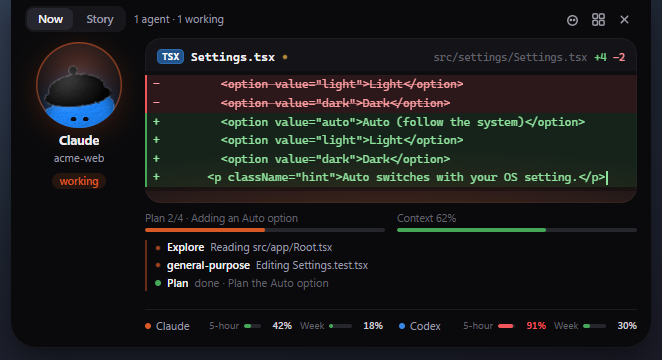
    A slim island shows every running agent and its live plan, like 2/4 · Detecting the system setting, plus your usage limits: Claude and Codex, 5-hour and weekly, with the time each one resets.

    • Opens on hover. Out of the way until you want it.
    • Glows amber when an agent needs your OK.
    • Flashes green when an agent is done.
      Screenshot of the real notch, open: Codex needs your OK to run npm install, Claude is working on step 2 of 4, a docs session is done, and usage bars for Claude and Codex 5-hour and weekly limits.
      The real one, open.

      03 Every agent, every session

      One pal per agent, side by side.

      Setup connects Claude Code and Codex for you. Anything else connects with one JSON POST. Sessions never mix, and every Claude Code session shows up, even ones that started before dotpals was installed.

      Claude Code

      Hooks for live state, including permission prompts, plus each session's transcript, so the history is complete even if the pal opened late.

      Setup adds the plugin for you

      Codex

      Follows Codex's session logs, so the CLI, the IDE extension and the app all show up. Nothing to install on the Codex side.

      Picked up automatically

      Any other agent

      POST JSON to 127.0.0.1:5175/event from your loop, a hook script or a wrapper. Try it on the orange pal:

      The same event from a script, with a session id so it gets its own pal and tab:

      curl -s localhost:5175/event -d '{
        "session": "run-42", "harness": "my-agent",
        "state": "working", "text": "Running tests"
      }'

      04 Make your own pal

      6 bodies × 6 eyes × 9 toppers × any color.

      The same registerCustom() the dashboard uses, running live on this page. Pick, roll, then watch it think, work and celebrate.

      Pip

      Body
      Eyes
      On top
      Color

      05 The dashboard

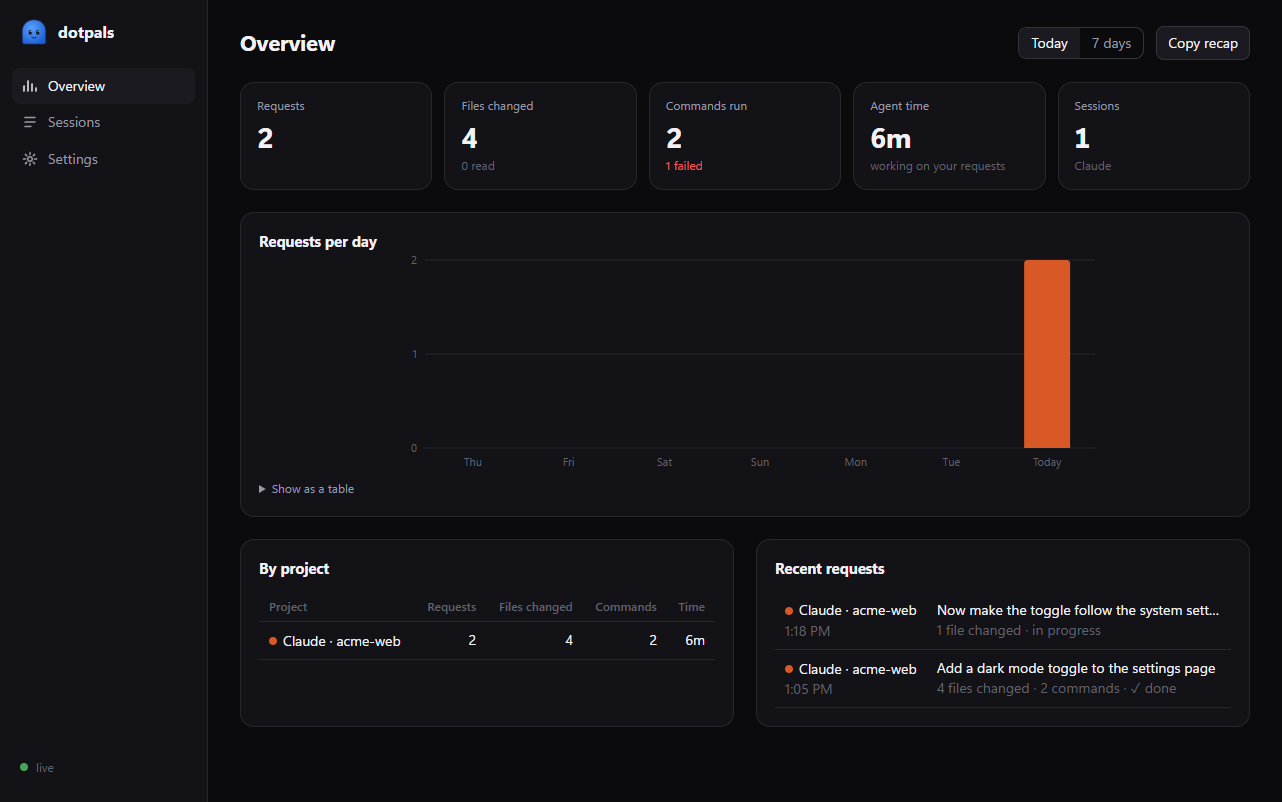
      Sessions, logs, stats and settings.

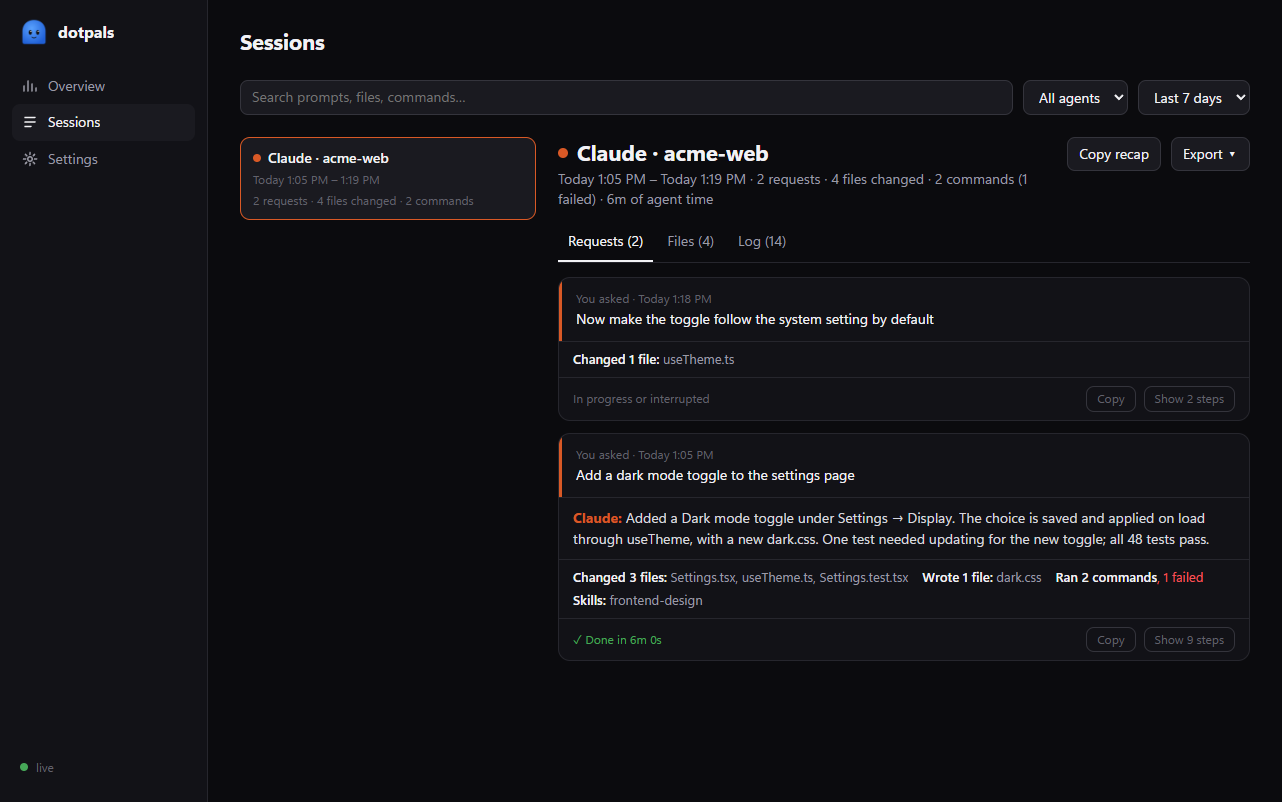
      Every session with its requests, files and full log. Search it, copy a recap for a PR, or export to Markdown or JSON.

      The dashboard Overview: 2 requests, 4 files changed, 2 commands with 1 failed, 6 minutes of agent time, a requests-per-day chart, a by-project table and recent requests.
      • Sessions

        Every request, what you asked and what the agent said it did.

      • Logs

        Every tool call with its command, output and diff.

      • Stats

        Requests per day, files changed, commands and time by project.

      • Settings

        Your pal, sounds, notifications and how long to keep history.

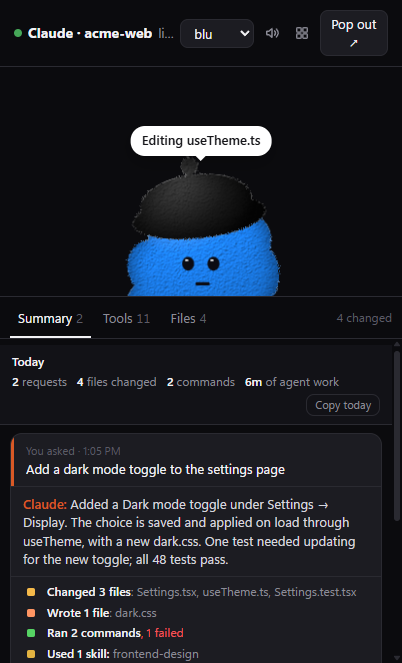
      The floating window's Summary tab: what you asked, Claude's own summary, and a tally of changed files, commands and skills.
      Summary one card per request
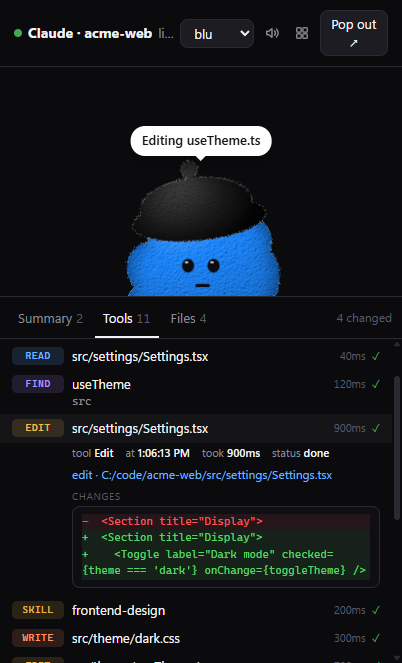
      The Tools tab with an Edit opened, showing its diff.
      Tools every call, click for the diff
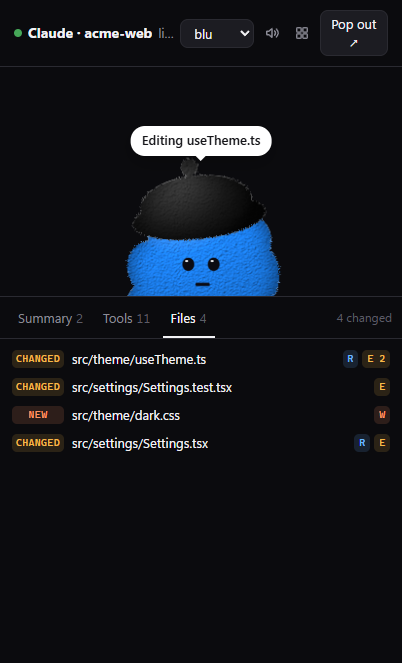
      The Files tab listing changed, new and read files.
      Files read, changed, created

      06 Local and private

      Nothing leaves your computer.

      A small local server, the bridge, turns what your agents report into one activity feed. It listens only on 127.0.0.1, only answers your own computer, and sends nothing anywhere unless you turn on the cloud test check.

      • History is a plain JSON file in ~/.dotpals, kept 7 days by default.
      • DOTPALS_HISTORY=0 turns history off. Clear it any time in Settings.
      • No account, no sign-up. MIT licensed, so you can read every line.
      • The test double-check is off by default. Local (Laya) stays on your computer; Cloud (Jev) sends only an unclear run’s output, with passwords, keys and emails removed.
      • Windows
      • macOS
      • Linux

      Give your agent a pal.

      One command installs the pal, adds the Claude Code plugin if you have it, picks up Codex, and opens the dashboard.

      npx --allow-git=all github:rikinshah787/dotpals setup
      Star on GitHub

      Only want the Claude Code plugin? /plugin marketplace add rikinshah787/dotpals then /plugin install dotpals@dotpals.