Documentation
See what your coding agent actually did.
dotpals is a small floating pal that watches Claude Code, Codex or any coding agent and tells you, in plain words, what happened: which files changed, which commands ran, what failed, and what the agent says it did. Everything stays on your computer.
your agents
one activity feed
A small local server on 127.0.0.1:5175. It keeps a history in ~/.dotpals and sends nothing anywhere (unless you turn on the cloud test checker).
live
What you get
- The story, not the log. Each request reads as a few chapters, such as “Changed 5 files +42 −7”, “Tests failed twice, then passed” and “Committed and pushed”, with anything risky flagged. See the story view.
- A live pal per agent that thinks, works, asks for your OK and celebrates, next to your editor.
- The notch: an island at the top of the screen with every agent, a live diff of what it's changing, its plan, its context window and your usage limits. It opens by itself when an agent needs you.
- A dashboard with every session, a timeline, a map of the files your agents touched, and settings.
- Every agent: Claude Code and Codex out of the box; Cursor, Gemini CLI, OpenCode and GitHub Copilot CLI with one click; anything else with one JSON POST.
Requirements
- Windows, macOS or Linux.
- Node.js 20 or newer. Setup checks this. The hook-based integrations run
node, so Node has to be on yourPATH. - About 100 MB for the desktop runtime (Electron), downloaded once into
~/.dotpals. Without it you can still use the pal and the dashboard in a browser. - An agent: Claude Code, Codex, Cursor, Gemini CLI 0.26 or newer, OpenCode, GitHub Copilot CLI, or anything that can send an HTTP request.
Install
One command, on any platform:
npx --allow-git=all github:rikinshah787/dotpals setupIt:
- checks that Node is version 20 or newer,
- copies dotpals to
~/.dotpals/app, a permanent home (npx runs from a temporary folder), - downloads the desktop runtime (Electron, about 100 MB) into
~/.dotpals, once, - creates the settings file,
~/.dotpals/config.json(anything you haven't set uses its default), - adds the Claude Code plugin, if the
claudecommand is installed, - checks for Codex (
~/.codex). There's nothing to install for it, - starts the pal, turns on Open when I log in, and opens the dashboard.
| Option | What it does |
|---|---|
--no-claude | Don't add the Claude Code plugin. |
--no-login | Don't start dotpals when you log in. |
--no-start | Install only; don't start the pal or open the dashboard. |
For example:
npx --allow-git=all github:rikinshah787/dotpals setup --no-login--allow-git=all lets npm 12 and newer install straight from GitHub. Older versions of npm ignore it, so the same command works everywhere.
To update, run the same command again. It replaces ~/.dotpals/app and keeps your settings and history.
If Electron can't be installed, setup says so, starts only the bridge and opens the dashboard in your browser. See Without the desktop app.
Only the Claude Code plugin
If you only use Claude Code, you can install dotpals from inside it instead:
/plugin marketplace add rikinshah787/dotpals
/plugin install dotpals@dotpals
Restart Claude Code, then run:
/dotpals:palsThe first time, it offers to download the desktop window's runtime (Electron, about 100 MB, into ~/.dotpals). If you'd rather not, it starts the bridge and opens the pal in your browser at http://localhost:5175. In that case you can name a pal: /dotpals:pals grok.
After that, the pal opens by itself whenever a Claude Code session starts or you send a prompt and it isn't already running. Set DOTPALS_AUTOSTART=0 to turn that off (see Configuration).
First run
The pal's window appears in the bottom-right corner of your screen, above your other windows, with “Waiting for your agent…”. Then:
- Restart Claude Code if it was open during setup, so it loads the plugin. (Its sessions show up from their transcripts anyway, a second or two behind.)
- Send your agent a prompt. A pal appears and thinks, works, asks for your OK and celebrates as the agent does.
- Read the Summary tab. One card per request: what you asked, what the agent said it did, and the story of what happened. Tools lists every tool call, and Files every file read or changed, with diffs.
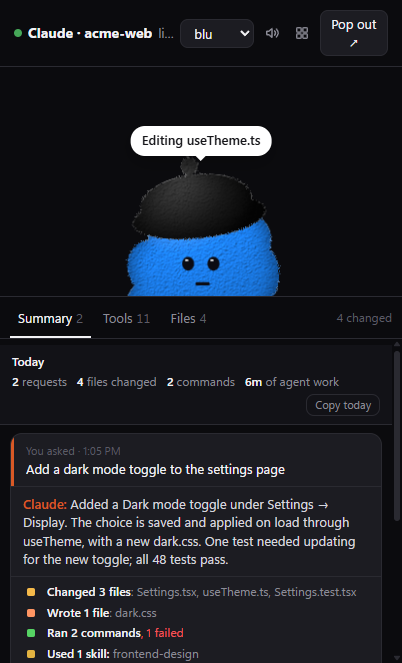
| Control | What it does |
|---|---|
| Ctrl+Alt+P (⌘⌥P on macOS) | Show or hide the pal from anywhere. |
| Drag the pal | Move the window. It remembers where you put it. |
| ▦ | Open the dashboard. |
| ⤡ | Switch between just the pal (small mode) and the full view. |
| × | Hide the pal. The notch takes over at the top of the screen. |
| 🔊 | Sounds on or off. |
| The pal menu | Choose your first pal. More sessions get the next characters. |
| Tray icon | Show or hide, Just the pal, Notch at the top of the screen, Dashboard, Notifications, Open when I log in and Quit dotpals. |
Then, if you like:
- Connect Cursor, Gemini CLI, OpenCode or GitHub Copilot CLI on the dashboard's Agents page. See Agents.
- See Claude Code's usage limits in the notch by running
dotpals statuslineonce. See Usage limits. - Make your own pal in the dashboard's Settings. See Make your own pal.
Running dotpals commands
Setup installs dotpals in ~/.dotpals/app, but it doesn't put a dotpals command on your PATH. Run commands the same way as setup, or with Node from the installed copy:
npx --allow-git=all github:rikinshah787/dotpals status

# or, from the installed copy
node ~/.dotpals/app/bin/dotpals.js status
In PowerShell, use node "$HOME\.dotpals\app\bin\dotpals.js" status. The rest of these docs write dotpals <command> for short. Every command is on the CLI page.
Without the desktop app
The bridge on its own serves everything in a browser, which is handy on a machine without a desktop, or if you'd rather not install Electron:
dotpals bridgehttp://127.0.0.1:5175/is the pal, with the same Summary, Tools and Files tabs. Pop out ↗ floats it above other windows in Chrome or Edge 116 and newer.http://127.0.0.1:5175/dashboardis the dashboard.
The notch, desktop notifications, click-through and the tray need the desktop app. Browsers also play sounds only after you've clicked the page once.